One window for every app you run. Multidex hosts modular apps, tools & skills on the
embedded Dexus engine, wires them into one App API, and puts an AI agent at the deck
that builds new modules — and drives the ones you have. In the neon window or straight in your
terminal. Shared peer-to-peer — signed, verified, yours.
Every capability is an isolated module you command from one deck — install, launch, build, wire together and distribute without leaving the window.
Apps · Tools · Skills
Every module runs isolated on the embedded Dexus engine — own port, logs and lifecycle — and lands in one of three grades: full apps, atomic tools and multi-step skills.
app · radio :34007tool · media-scanskill · daily-digest
AI agent at the deck
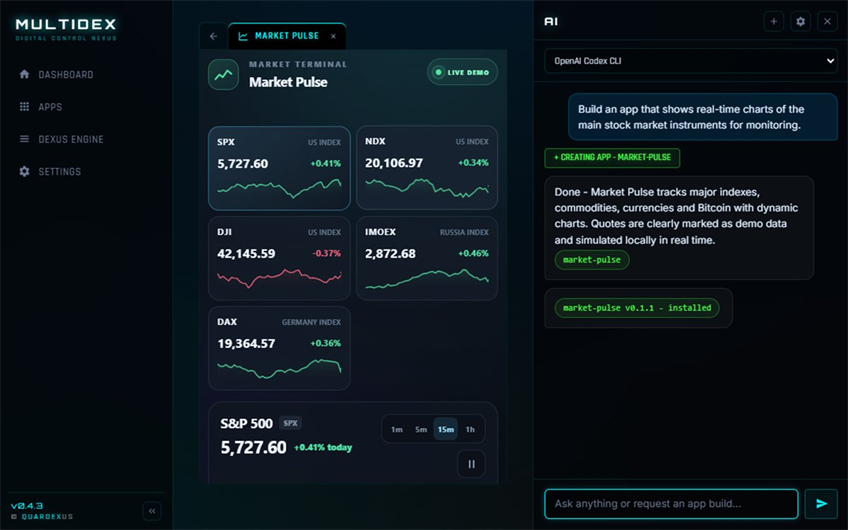
Ask for “a real-time stock market monitor” — the agent writes, signs and installs it as a live module. Then keep asking: it answers, operates your modules and calls their capabilities.
» build a market monitor✓ installed in 40s» stop radio ✓
One App API
Modules declare tools, events and skills once — in the manifest. The agent, neighbour apps and paired peers call them through one bus: schema-checked, permissioned, journaled.
A built-in MCP gateway projects every declared capability to external agents — Claude, IDEs, scripts — behind a Bearer token. Destructive calls still stop for a human yes.
POST /api/v1/mcpnotes__create2-phase confirm
GUI or terminal — same deck
One binary, four modes. Open the neon window, or add --console for a full pseudographic workspace — Library, agent chat, sharing and settings in plain text. --server runs headless, --daemon detaches.
The deck agent thinks on the built-in local engine out of the box — or your API provider, or a full coding agent: Claude Code, Codex, Cursor. CLI agents run in the terminal, GUI agents plug in via Multigen.
builtin · zero keysclaude code · clicodex app · via multigen
Dex store & P2P
Publish modules as signed .qbox packages — one package carries Windows, Linux and macOS binaries — pull apps from other instances, or serve your own catalog.
Ngrok tunnel
Expose your catalog to the internet with a built-in tunnel — remote instances install your shared apps in one click.
20 languages · 3 themes
Translation packs baked into the binary — switch instantly. Three shells: quardex neon, matte dark, calm light. Modules follow the theme live.
Signed & safe
Every package is Ed25519-signed and SHA-256 verified on install. Releases are immutable, trust keys are baked into the binary. All of it enforced in the compiled backend.
// 02 · AI agent
Describe it. Ship it. Drive it.
Chat with the deck agent right inside Multidex — in the window or the terminal. Say what you want — the agent generates a complete module, signs and installs it, streaming every file into the chat as a live, collapsible card. Already installed? It calls that module's API instead: answer first, operate second, build only when asked.
Built-in local engine out of the box — or Anthropic, OpenAI-compatible, Ollama
Or seat a coding agent: Claude Code, Codex, Cursor — CLI & GUI via Multigen
Auto-repair loop until the build passes; edits never clobber a newer install
Every installed module becomes a skill the agent can call
Destructive actions wait for your explicit confirm
multidex agent
multidex — market pulse · built & driven by ai
// 03 · control deck
All your apps, one Library
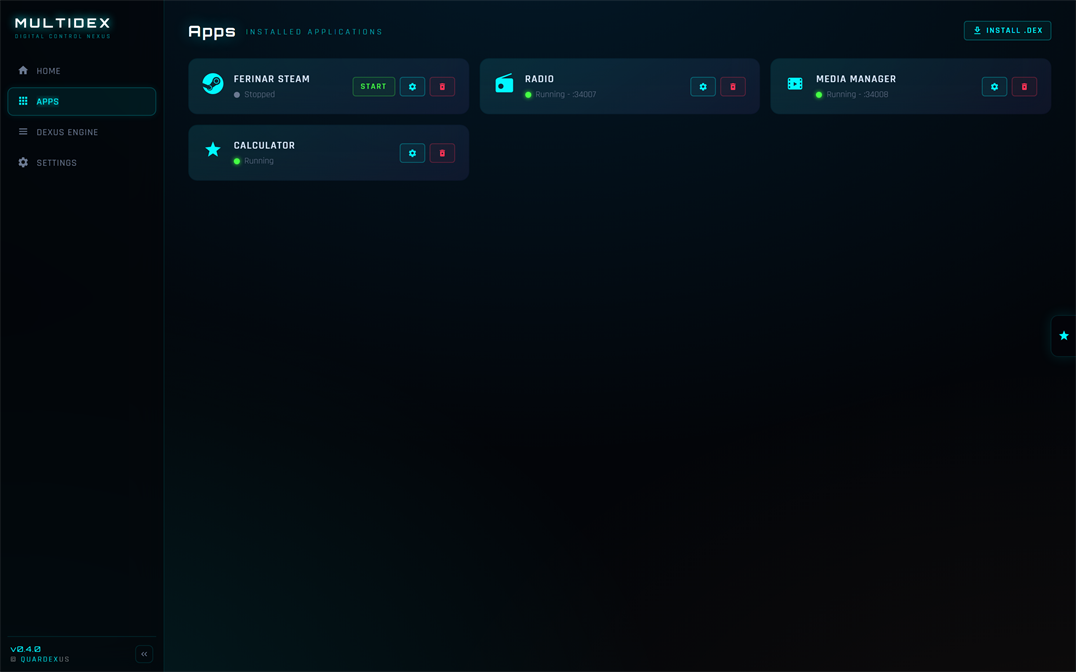
The Library holds every installed module — icon, live status and port — grouped into Apps, Tools and Skills. Launch, configure and remove them — or open any app right inside the nexus.
One-click install of .qbox packages
Apps · Tools · Skills groups — plus your own
Live status, ports and logs per module
Running apps update in place — queued, verified, restarted
Browse remote stores & instances
multidex — library
// 04 · app api
Declared once. Called from anywhere
A module ships its API in the manifest — tools, events and multi-step skills. Multidex turns that one declaration into a control surface for every caller: the deck agent, neighbour modules, the terminal workspace, external agents over MCP, even paired peers.
App-to-app calls under per-capability permissions
Declarative skills chain modules into one command
Destructive ops wait on a plan and your explicit yes
Every call schema-validated, rate-limited, journaled
App APIbus journal · live
Caller
Capability
Status
agent
notes.create
✓ 12 ms
market-pulse
calendar.add
✓ grant
mcp · claude
radio.play
✓ 8 ms
agent
library.purge
confirm?
peer · office
media.scan
denied
// 05 · dexus engine
An engine, not a launcher
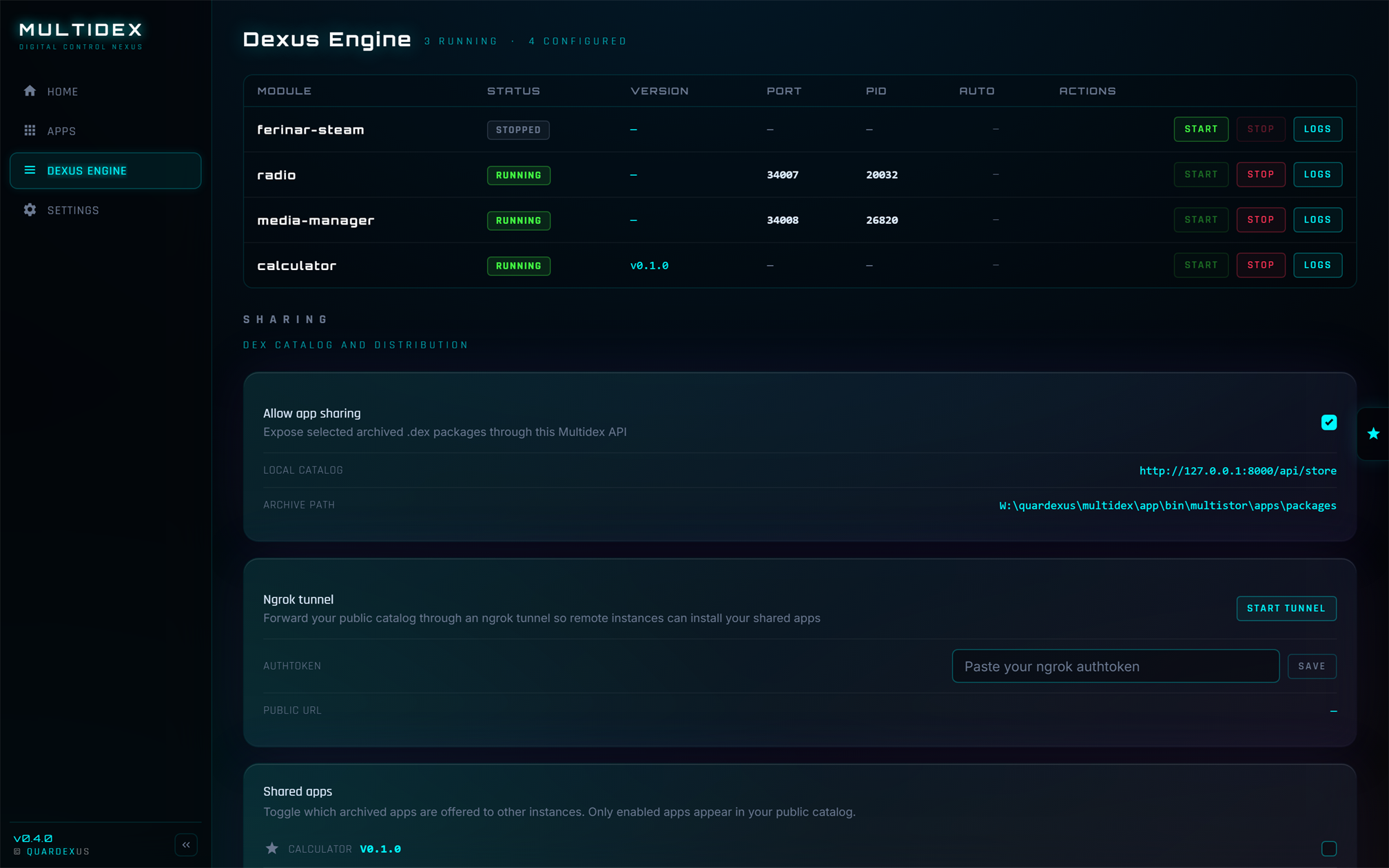
Under the deck runs Dexus — a process engine that supervises every module: spawn, port allocation, health, logs, autostart. The same engine sits behind the window, the terminal and the headless server. You see everything. You control everything.
Isolated process per module, own port & PID
Start, stop and inspect logs in real time
Native binaries or pure web modules
Per-app operation queues — installs, updates and agent edits never collide
Dexus Engine0 running · 4 configured
Module
Status
Port
PID
radio
stopped
—
—
media-manager
stopped
—
—
market-pulse
stopped
—
—
ferinar-steam
stopped
—
—
// 06 · terminal mode
One flag from window to terminal
The same binary that opens the neon window renders the whole nexus as pseudographics: pass --console and the deck is right there in your terminal — Library, agent chat, sharing, settings. Pseudographic boot logo included.
Full GUI parity: install .qbox, chat with the agent, publish & pull, trust prompts with key fingerprints
--server runs headless, --daemon detaches — same engine, same API
Modules can ship their own CLI — Enter hands them the terminal, q hands it back
Every action runs through the same compiled, signed backend as the GUI
multidex-app --console
MULTIDEXLibraryAgentSharingSettings
▸radio● running:34007CLI
media-manager● running:34008
axon● running:34002CLI
market-pulse○ stoppedweb
↑↓ select · s start/stop · enter module cli · a autostart · f follow logs · q quit
// 07 · live from the store
Top modules available now
Pulled straight from the official Dex store. Install any of these into your nexus in one click.
MULTIDEX
// deploy
Bring the nexus home
Download Multidex and start building — and commanding — your own hub of apps.
One download for your desktop: window, terminal, server and daemon included.